
Description
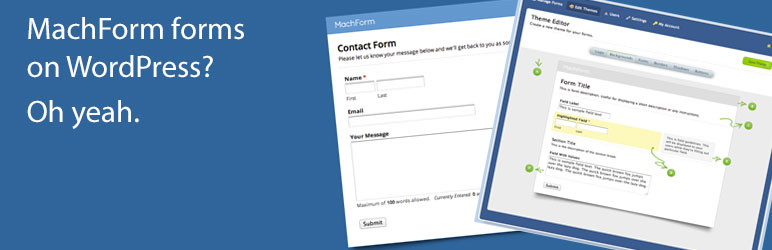
MachForms is an excellent, easy to use form builder that you host on your own server or site. Until now, its been difficult and required « jumping through some hoops » to embed a form made with MachForm on your WordPress site. That is no more! You can now add a MachForm form anywhere on your site using a simple shortcode! Need a form in a blog post? Need a form on a page? No problem.
For more information, check out the plugin page on our website.
Features include:
- Support for javascript based forms
- Support for iframe based forms
- Support for URL Parameters
Easy to use! This plugin isn’t just for developers, no matter what your skill level you can use this plugin to easily add forms from your MachForms system to your website!
How to use the shortcode:
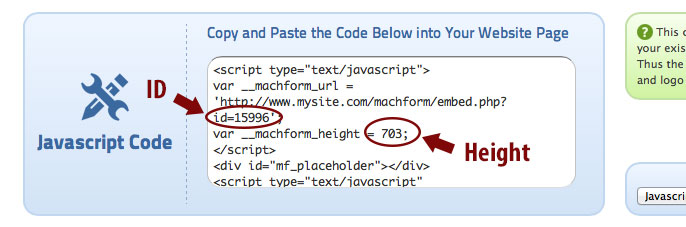
- Click the « Code » option on your form inside of MachForm to see the embed codes.
- Make note of your form’s « ID » and the « height ».
- Use the shortcode to embed your form into your content using this format: [machform type=(« js » or « iframe ») id=(ID #) height=(height #)]
- You are done, your form should show in your content now!
URL Parameters:
The plugin now supports URL parameters. The parameters are easy to pass via the shortcode by simply including the parameter and value inside of the shortcode like the following example:
[machform type=js id=1593 height=703 element_1_1= »Field Text Here » element_1_2= »Field Text Here »]
For more information on using URL Parameters with MachForm, please see their website by clicking here.
Review or Rating
Don’t forget to leave a review or a rating, and also connect with us on social media! Thank you for your support.
IMPORTANT NOTE: MachForms is a 3rd party application sold by AppNitro. Installing this plugin allows you to use a shortcode anywhere on your site to embed a form that is created in MachForms. This plugin does not provide a form builder interface.
Captures d’écran

Installation
- Install MachForm Shortcode either via the WordPress.org plugin directory, or by uploading the files to your server
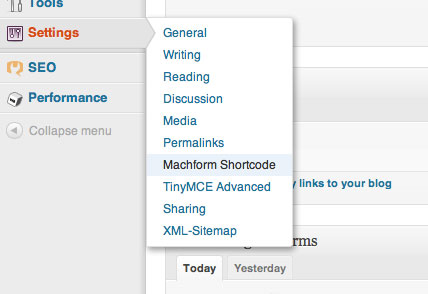
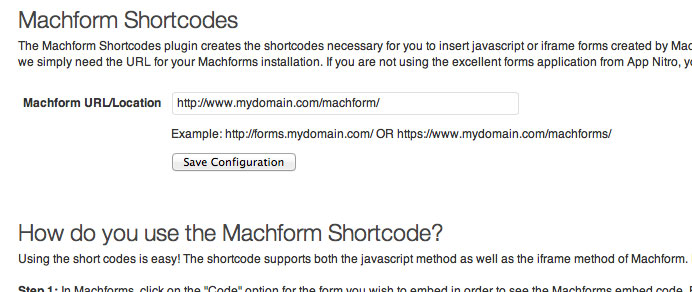
- After activating MachForm Shortcode, navigate to the « MachForm Shortcode » menu link under « Settings » in your WordPress admin.
- Supply the URL/location of your MachForm installation and click « Save Configuration ».
- You’re done! Use the shortcode to add forms to your site!
FAQ
-
What version of MachForm does this plugin work with?
-
We have only tested the plugin with versions 3.5 and 4.x of MachForm. If you have an older version, and the plugin does not work with it, please contact us and we’ll add support for it (we would need a sample form and a copy of what the embed string looks like)! You can contact us by visiting our website at www.laymance.com.
-
I’ve found a bug, what can I do?
-
Please let us know and we’ll get it fixed right away. Contact us via our website at www.laymance.com.
-
What is the shortcode format?
-
Here is how to use the shortcode:
[machform type=(« js » or « iframe ») id=(ID #) height=(height #)]
If the « type » is not given, it will default to the javascript (« js ») method.
If the « height » is not given, it will default to a height of 800 pixels. But please give the height to ensure that your form appears correctly!
The ID is a REQUIRED field.
-
I want the plugin to do XXX or have feature XXX, can you add it?
-
Most likely! Shoot us an email at support@laymance.com and tell us what you want added, we’ll do our best!
Avis


Contributeurs & développeurs
« MachForm Shortcode » est un logiciel libre. Les personnes suivantes ont contribué à cette extension.
Contributeurs

Traduisez « MachForm Shortcode » dans votre langue.
Le développement vous intéresse ?
Parcourir le code, consulter le SVN dépôt, ou s’inscrire au journal de développement par RSS.
Historique des changements
1.5
- Fixes a cross-site scripting vulnerability where someone with admin access could enter code into the MachForm configuration fields
- Minor code cleanup
1.4.1
- Fixes an undefined variable notice being thrown by PHP for those users/hosts who show all errors to the screen. It should be noted that it is recommended that error notices be turned off on production servers because errors (from WP or any plugin) can expose information about your setup, etc., to the public as well as those with less than good intentions (hackers).
1.4
- Added case handling for shortcode parameters, lowercase is no longer required.
e.g. The « type » key can be TYPE, type, TyPe, etc., and the key value can be any case: « js », « JS », « Js », « iFrame », « IFRAME », etc. - Added a note to make it clear that MachForms is a 3rd Party web app that is NOT included with the plugin
- Updated links to MachForms from appnitro.com to their new website of MachForm.com
- Formatting changes to the settings screen
- Some general code cleanup
1.3
- Fixed an conflict that would occur when using the Yoast SEO plugin along with Divi Builder. Yoast would attempt to execute the shortcodes in order to get text for the SEO description, but the load of the MachForm javascript would fail because the shortcodes were not visible on the page (hidden in the page builder blocks).
1.2
- Added a note to make it clear that this plugin doesn’t provide a form builder interface, it only allows the 3rd Party app MachForms to be used on a site easily.
- Added text asking for the user to leave a review for the plugin on the WordPress Plugin Directory – this text is on the settings page, unobtrusive (we hate plugins that plaster admin banners for that type of stuff).
1.1
- Added URL Parameters support
1.0
- Initial release