

Description
Role Based Content Restrictor allows you to restrict access to individual posts, pages, and custom post types based on user roles or login status — now with a simplified and intuitive interface.
Key Features
- Restrict content based on user roles
- Restrict content to logged-in users only
- Restrict content to logged-out users (visitors only)
- Set a custom redirect page per post
- Configure a global fallback redirect from plugin settings
- Clean radio-based UI to avoid conflicting settings
- Fully backward compatible with previous versions
Improved Restriction UI
The plugin now uses a single “Restriction Type” selector instead of multiple toggles:
- No Restriction
- Restrict access to this content for roles
- Restrict to Logged-in Users Only
- Restrict to Logged-out Users Only (Visitors Only)
Only relevant fields are shown based on the selected option, making configuration clearer and preventing conflicts.
Smart & Conflict-Free Logic
The plugin ensures consistent behavior with a clear priority system:
- Visitors Only highest priority (logged-in users are redirected, except administrators)
- Logged-in Only restricts access to authenticated users
- Role-based restriction applies when selected
Visitors Only Behavior
When Visitors Only is enabled:
– Logged-out users can access the content
– Logged-in users are redirected to a selected page
– If no page is selected, the plugin uses the post redirect or global fallback
– Administrators are always allowed access
Backward Compatibility
Existing settings are fully preserved:
– Older saved configurations are automatically mapped to the new interface
– No data loss when switching between restriction types
– Hidden fields are not submitted to prevent accidental overwrites
Perfect for:
* Membership sites
* Learning Management Systems (LMS)
* Intranets and company portals
* Client dashboards or gated content areas
* Login / Register pages (visible only to visitors)
Lightweight, developer-friendly, and works with any theme or builder (Elementor, Gutenberg, etc.).
About the Author
Inzamam Abbasi – Professional WordPress Developer with over 10 years of experience, specializing in custom plugin development and scalable WordPress solutions.
Delivered 1,000+ projects including membership systems, LMS platforms, and enterprise WordPress solutions.
Learn more at https://inzidev.com
Captures d’écran

Global settings page for default redirect configuration. 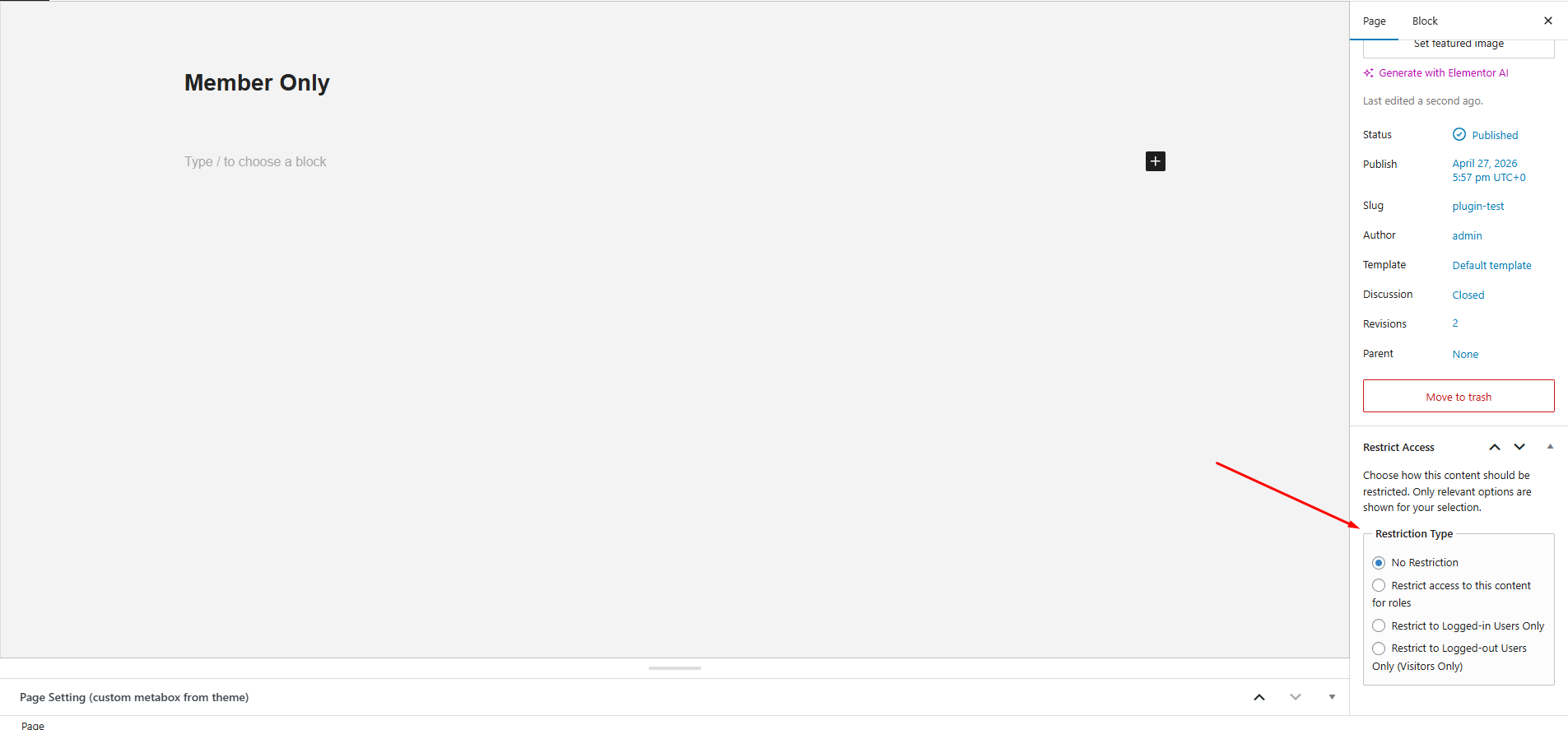
Restriction Type selector with radio-based UI. 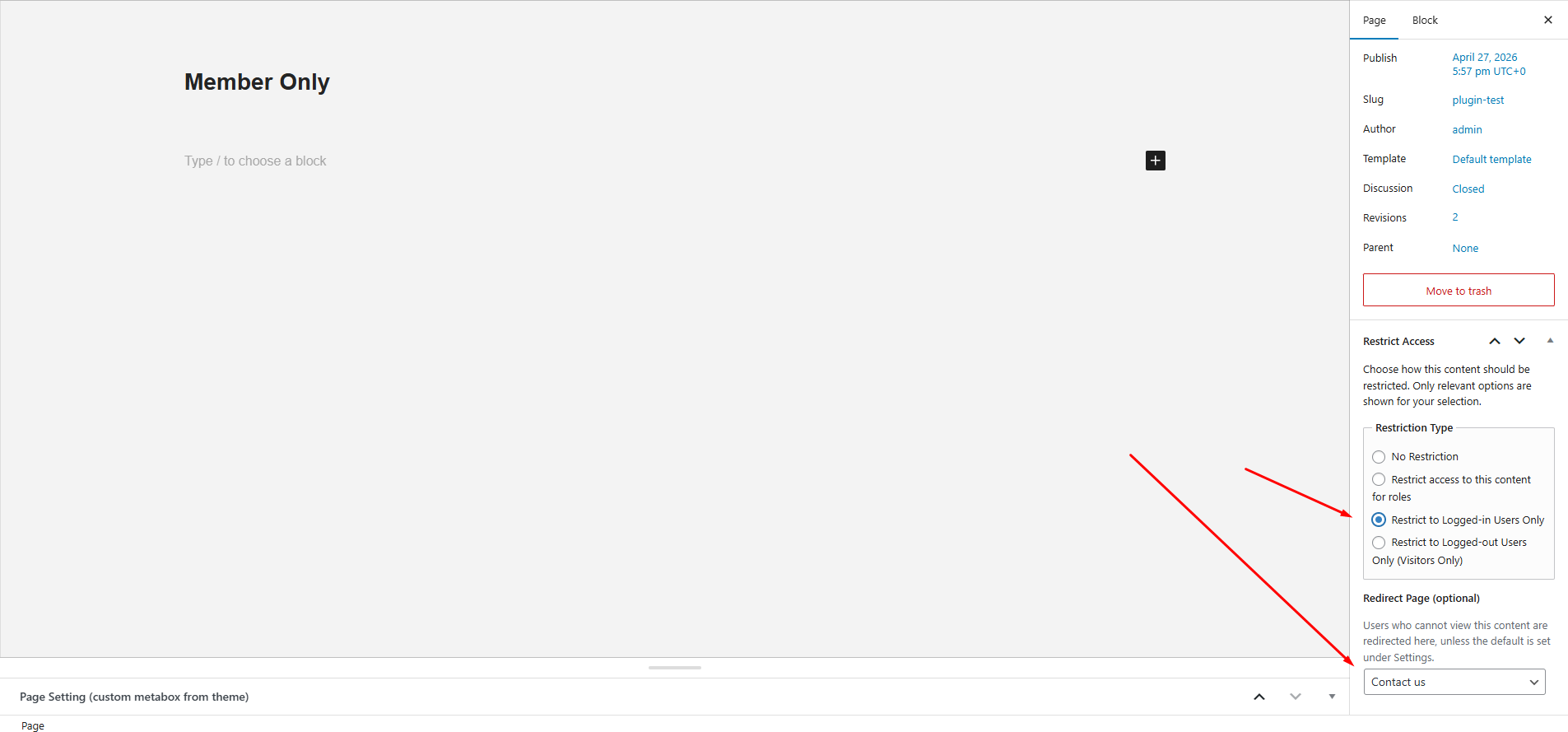
Dynamic fields based on selected restriction type (roles, redirects, visitors-only settings).
Installation
- Upload the plugin folder to
/wp-content/plugins/role-based-content-restrictor/or install directly from the WordPress Plugin Directory. - Activate the plugin from Plugins > Installed Plugins.
- Go to Settings > Role Restrictions to configure the default redirect.
- Edit any page/post and use the Restrict Access meta box to:
- Select restriction type
- Configure roles (if applicable)
- Set redirect behavior
FAQ
-
Will it work with custom post types?
-
Yes! The plugin works with all public post types registered in WordPress.
-
Can I restrict pages to only logged-in users?
-
Yes, select “Logged-in Users Only” from the restriction type.
-
Can I restrict pages to only visitors (logged-out users)?
-
Yes, select “Visitors Only”. Logged-in users will be redirected automatically.
-
What happens if multiple restriction types were previously enabled?
-
The plugin automatically resolves them into a single restriction type using a priority system, ensuring consistent behavior.
-
Can I redirect users to an external URL?
-
Not yet. You can redirect them to a page where you handle the external redirect using a script or shortcode.
-
Does it support multiple roles per page/post?
-
Yes, when using role-based restriction, you can select multiple roles.
-
What happens if no redirect page is set?
-
The plugin will use the global fallback page set in the plugin settings. If that’s not set, users are redirected to the homepage.
Avis


Contributeurs & développeurs
« Role Based Content Restrictor » est un logiciel libre. Les personnes suivantes ont contribué à cette extension.
Contributeurs
Traduisez « Role Based Content Restrictor » dans votre langue.
Le développement vous intéresse ?
Parcourir le code, consulter le SVN dépôt, ou s’inscrire au journal de développement par RSS.
Historique des changements
1.3.0
- Added Logged-in Users Only restriction option.
- Added Visitors Only (Logged-out Users Only) restriction option.
- Introduced radio-based restriction UI for cleaner and conflict-free configuration.
- Implemented priority-based restriction handling (Visitors Only Logged-in Roles).
- Improved meta handling with full backward compatibility.
- Prevented accidental data overwrite using conditional field saving.
- Enhanced admin UI with dynamic field visibility.
1.2.0
- Confirmed compatibility with WordPress 6.9
1.0.2
- Minor fixes for submission and compliance with WordPress.org guidelines.
1.0.1
- Improved compatibility with WordPress.org guidelines.
- Updated text domain and folder structure.
- Minor code cleanups.
1.0.0
- Initial public release.