

Description
Harbor Checkout Fields for WooCommerce lets you add custom fields to WooCommerce’s block-based checkout without writing code.
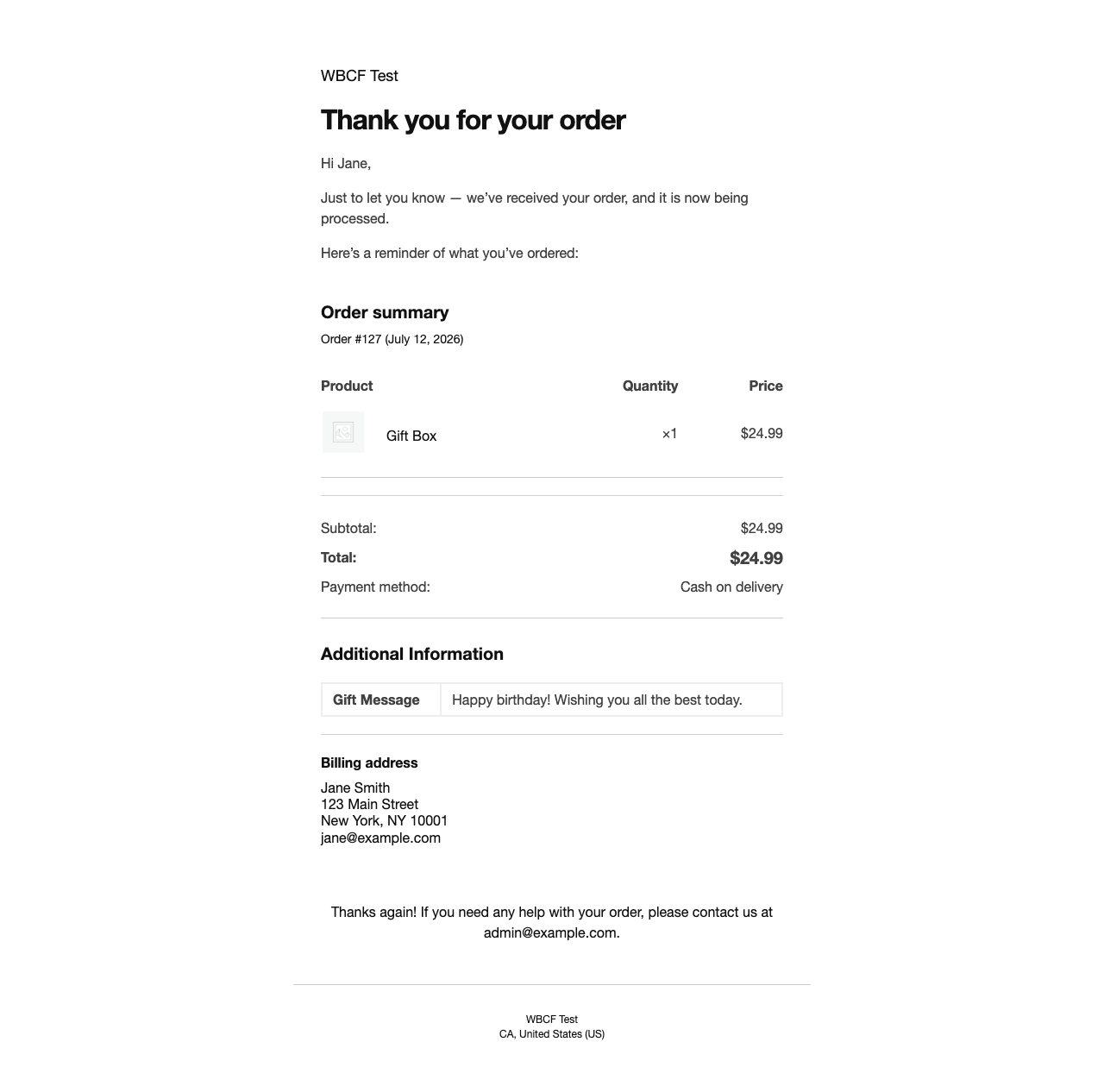
Fields are collected at checkout, saved to order metadata using WooCommerce’s HPOS-safe order API, and automatically appear in the admin order detail screen and in customer confirmation emails.
Real-world use cases
- Gift message – let customers include a message for the recipient
- Delivery instructions – collect access codes, gate instructions, or preferred drop-off spots
- B2B purchase order number – required for invoice reconciliation
- How did you hear about us? – a select dropdown for attribution tracking
- Age confirmation checkbox – required for alcohol, tobacco, or age-gated products
- Special requests or dietary notes – for food, events, or personalised items
Free Features
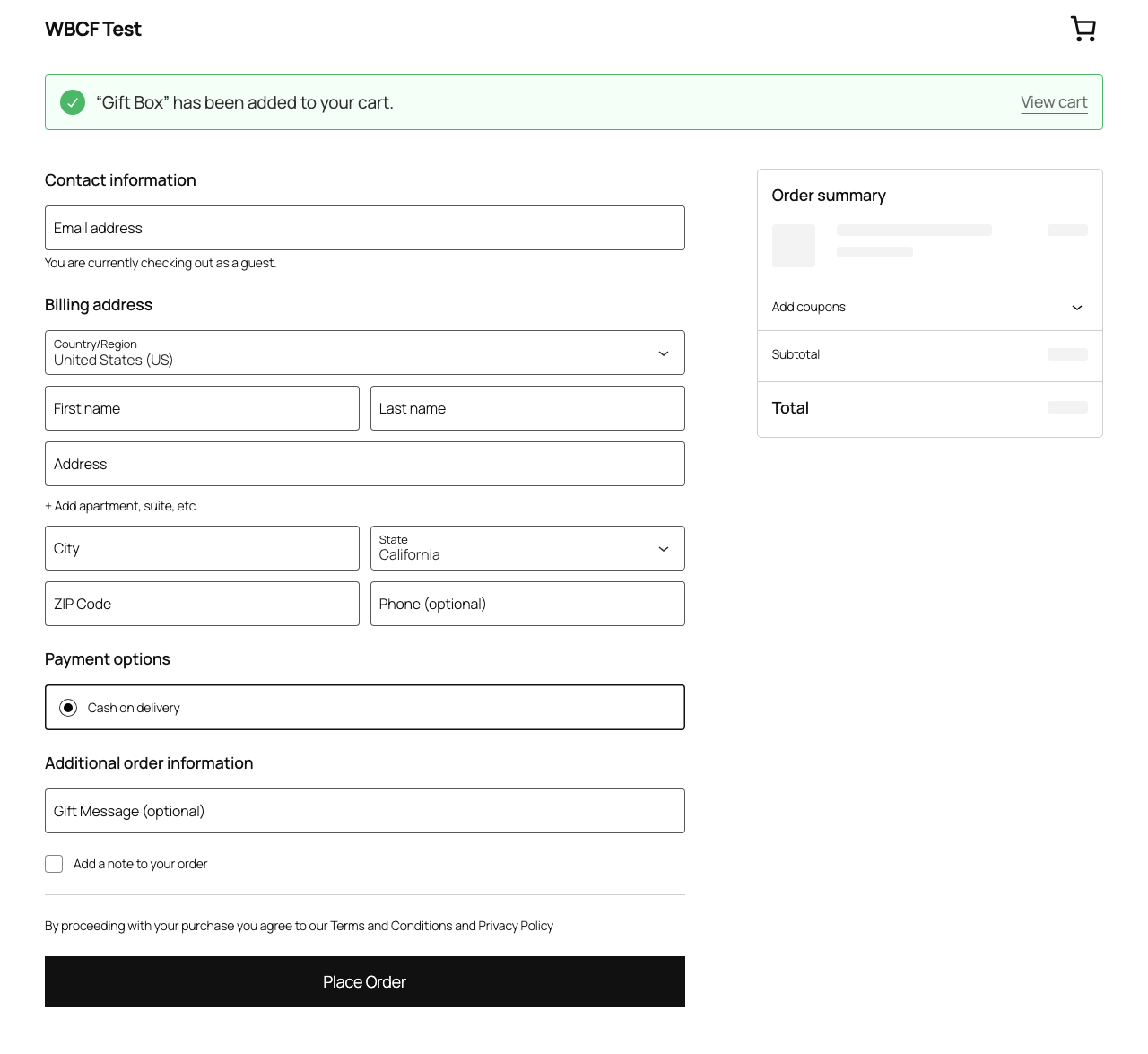
- Add text, email, phone, checkbox, and select (dropdown) fields to the block checkout
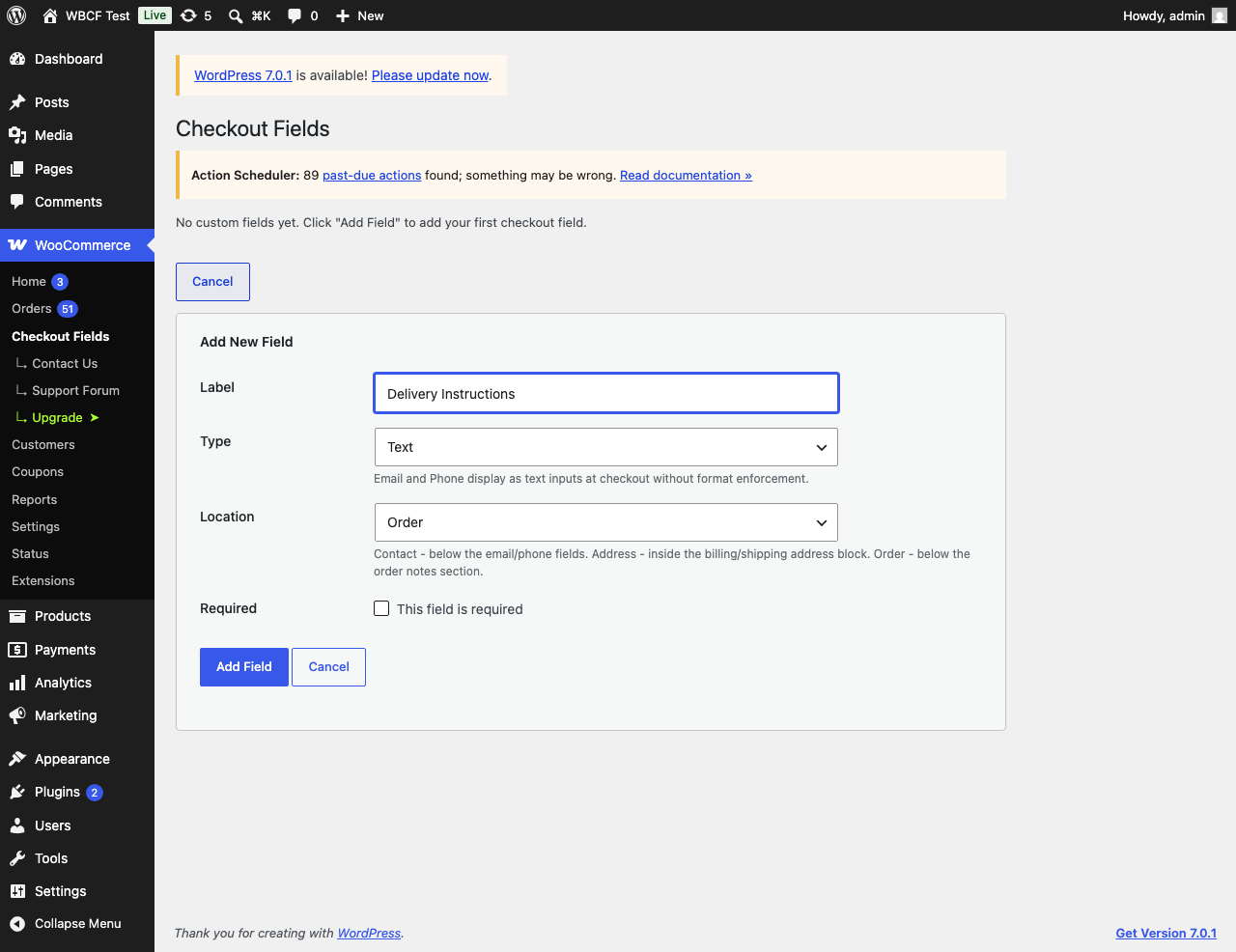
- Choose field location: Contact section, Address block, or Order section
- Mark fields as required or optional
- Add a placeholder prompt to select fields
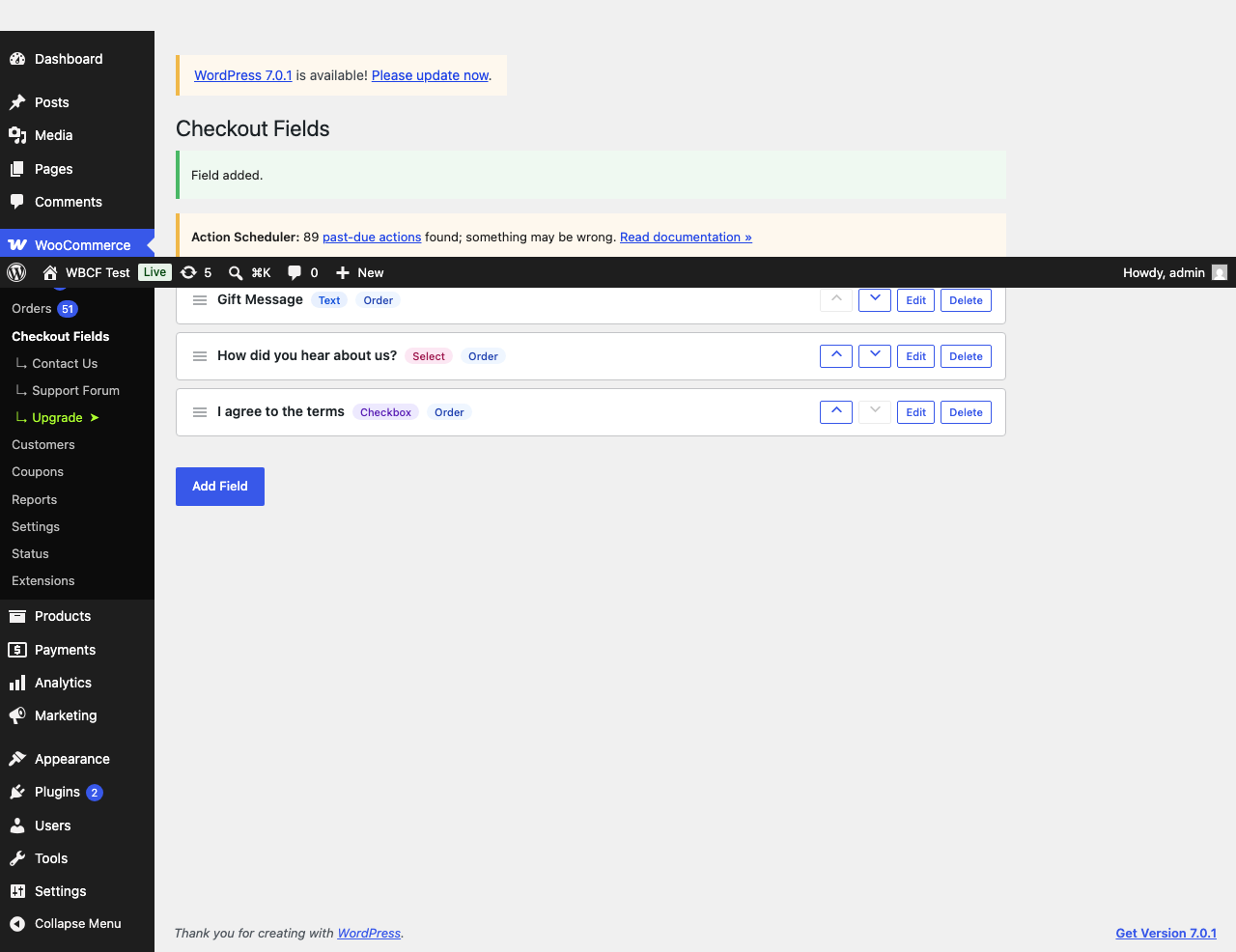
- Drag-to-reorder fields in the admin settings page
- Field values saved to order metadata (HPOS-compatible)
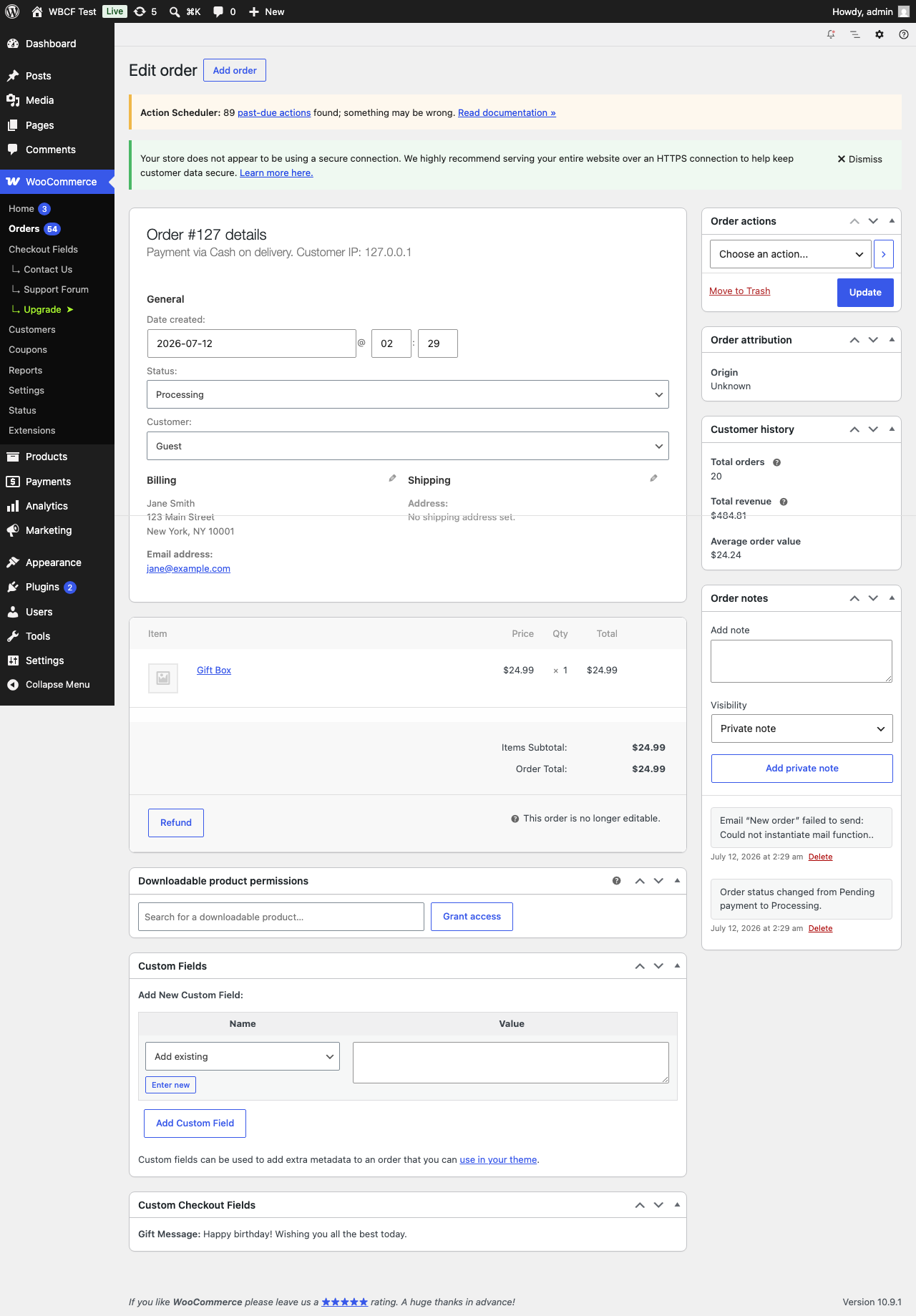
- Values displayed in the admin order detail view (after billing address)
- Values displayed in customer and admin order confirmation emails
- No coding required – works out of the box
How it works
Fields are registered with WooCommerce’s official block checkout additional-fields API (available in WooCommerce 8.9 and later). Values are stored on the order with the HPOS-safe order API and read back with $order->get_meta(), so no direct database queries are made against order tables.
Requirements
- WordPress 6.4 or later
- WooCommerce 8.9 or later (block checkout additional fields API)
- PHP 8.2 or later
- WooCommerce block checkout (not the legacy shortcode checkout)
- HPOS (High Performance Order Storage) compatible
Support
For help with the plugin, post in the WordPress.org support forum or email support@harborplugins.com.
Captures d’écran
Installation
- Upload the plugin folder to
/wp-content/plugins/ - Activate the plugin through the Plugins screen in WordPress
- Go to WooCommerce > Checkout Fields to add your first field (or click Settings in the plugin list)
- Ensure you are using the WooCommerce block checkout (not the legacy shortcode checkout)
FAQ
-
Does this work with the classic/legacy WooCommerce checkout?
-
No. This plugin targets the WooCommerce block checkout exclusively. For the legacy shortcode checkout, use WooCommerce’s Checkout Field Editor or a similar plugin.
-
Is this plugin compatible with HPOS?
-
Yes. Field values are saved automatically by WooCommerce when a registered field is submitted. The plugin reads them via
$order->get_meta(). No direct database queries against order tables are made. -
What WooCommerce version is required?
-
WooCommerce 8.9 or later. The
woocommerce_register_additional_checkout_field()function was introduced in WooCommerce 8.9. -
What PHP version is required?
-
PHP 8.2 or later. PHP 8.0 and 8.1 reached end-of-life and are no longer supported.
-
Where do field values appear?
-
Field values appear in:
- The WooCommerce admin order detail screen (after the billing address)
- Customer and admin order confirmation emails
-
What does the Location setting do?
-
Location controls where the field appears in the block checkout:
- Contact – below the email and phone fields
- Address – inside the billing/shipping address block
- Order – below the order notes section
-
Can I reorder fields?
-
Yes. Drag the handle icon on the left of each field row in WooCommerce > Checkout Fields to change the display order.
-
How many fields can I add?
-
There is no hard limit enforced by this plugin. WooCommerce’s own additional fields API handles rendering. Keeping the number of fields small helps keep checkout simple for customers.
-
Will it slow down my store?
-
No. Fields are registered server-side using WooCommerce’s official API. No JavaScript is injected into the checkout frontend. The admin settings use lightweight AJAX.
-
What happens to field data if I deactivate the plugin?
-
Field values are stored as order meta on each order and will remain in your database. If you reactivate the plugin, historical field values will be visible again. Deleting a field from the settings page removes it from future checkouts and from the order and email displays; the stored values are not deleted and remain in the database.
-
Does it work with Stripe, PayPal, and other payment gateways?
-
Yes. Fields are rendered and validated by the WooCommerce block checkout before payment is processed. They are compatible with all major payment gateways.
-
Is this compatible with popular page builders and themes?
-
Yes. Because this plugin uses WooCommerce’s official block checkout extensibility API, it works with any theme that uses the standard WooCommerce block checkout.
Avis
Il n’y a aucun avis sur cette extension.
Contributeurs & développeurs
« Harbor Checkout Fields for WooCommerce » est un logiciel libre. Les personnes suivantes ont contribué à cette extension.
Contributeurs
Traduisez « Harbor Checkout Fields for WooCommerce » dans votre langue.
Le développement vous intéresse ?
Parcourir le code, consulter le SVN dépôt, ou s’inscrire au journal de développement par RSS.
Historique des changements
1.0.0
- Add text, email, phone, checkbox, and select fields to the WooCommerce block checkout
- Choose field location: Contact, Address, or Order section
- Mark fields as required or optional; add a placeholder prompt to select fields
- Drag-to-reorder fields with persistence via AJAX
- AJAX-powered add, edit, delete, and reorder – no page reloads
- Inline delete confirmation; no browser alert dialogs
- Duplicate label detection on both add and edit forms
- Select field options editor (value|Label format, one per line)
- Checkbox fields are never stored as required (WooCommerce restriction)
- HPOS-safe: field values read via
$order->get_meta(), no direct DB queries - HPOS and block checkout compatibility declared to WooCommerce
- Field values displayed in admin order detail view (after billing address)
- Field values displayed in customer and admin confirmation emails (HTML + plain text)
- AJAX write operations rate-limited to 60 requests per minute per user
- Empty state shown when no fields exist; hidden when at least one is added
- Toast notifications with aria-live screen reader announcement on every action
- Focus returns to Edit button when edit form is cancelled (keyboard/SR navigation)
- Full accessibility: aria-live regions, aria-expanded, role= »status/alert » attributes
- GitHub Actions CI: PHPUnit matrix (PHP 8.2/8.3/8.4), PHPCS (WordPress Coding Standards), Playwright E2E
- Unit tests across field registry, storage, admin settings, and sanitisation, plus Playwright E2E coverage
- Requires PHP 8.2 or later (PHP 8.0/8.1 are end-of-life)